

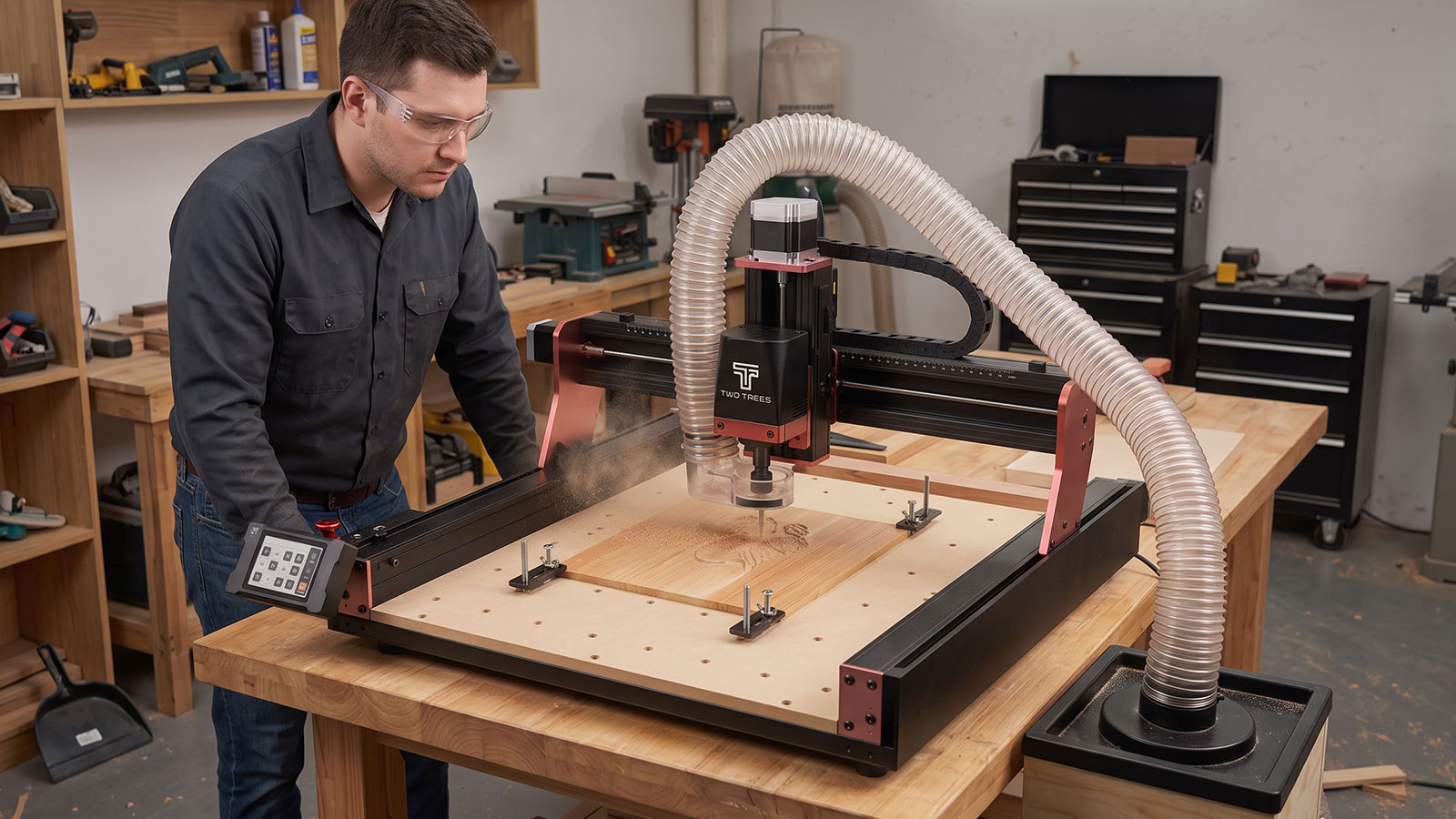
CNC router safety comes down to a handful of habits: control the dust, keep clear of moving parts, wear the right PPE, and know where your emergency stop is before you need it. None of this is complicated, but it matters every single time you run the machine, not just when something feels unusual. This guide covers the main hazards, what to do about each one, and a printable checklist to keep near your machine.
This article covers general good practice. It isn't a substitute for the safety instructions in your CNC router's manual, and if something on your machine seems unsafe or isn't working as expected, stop and check the manufacturer's documentation, or a qualified technician, before continuing.
Common CNC Router Hazards
Most CNC router incidents at home come down to a small number of causes, and being aware of them is most of the battle.
- Moving parts — the spindle, gantry and bed all move during a cut, and can catch hair, clothing or fingers that get too close.
- Dust and fine particles — wood, MDF and some plastics produce fine dust that's unpleasant and, over time, unhealthy to breathe in without control measures.
- Fire risk — dust buildup around a hot motor or spindle, or an overloaded power point, both increase fire risk if left unchecked.
- Electrical hazards — damaged cables, wet hands, or a machine used outside its rated conditions all raise the risk of shock.
Dust & Fire Risk
Dust is the hazard that's easiest to underestimate, since it builds up gradually rather than all at once.
- Run dust extraction from the first cut — a unit like the Two Trees CNC Vacuum Upgrade (CAT.NO TL9001) captures chips and dust at the source rather than letting them spread and settle.
- Clear dust build-up regularly — dust that accumulates around the motor, spindle or electrical connections is a fire risk if it isn't cleaned out.
- Don't leave a running machine unattended — stay in the room while a job is running so you can respond immediately if something looks or smells wrong.
- Keep a general-purpose fire extinguisher within reach of your workspace, and know how to use it, as you would with any workshop power tool.
Moving Parts & Pinch Points
The gantry, spindle and bed all create pinch points where a hand, sleeve or hair can get caught while the machine is running.
- Keep hands clear of the work area once a job starts, and never reach in to clear chips or check progress while the spindle is turning.
- Tie back long hair and avoid loose clothing or dangling jewellery around the machine, the same way you would around any powered workshop tool.
- Wait for the machine to come to a complete stop before opening an enclosure, adjusting the workpiece, or changing a bit.
- Keep other people and pets away from the machine while it's running, particularly children who may not recognise the risk.
PPE for CNC Routing
A small amount of PPE covers most of what CNC routing throws at you.
- Eye protection — a pair of wrap-around clear safety glasses guards against chips and dust flung up from the cut.
- Dust mask — a P2-rated disposable mask is worth keeping on hand for sanding, dusty materials, and clearing built-up chips by hand.
- Hearing protection — worth having for longer jobs or an upgraded spindle, particularly in a smaller room.
Using the Emergency Stop
Know where your machine's emergency stop is before you run your first job, not after something's already gone wrong.
- Locate it before you start — check your machine's manual for the exact location and function of its emergency stop or power cut-off.
- Test it works — as part of your regular routine, confirm the emergency stop actually halts the machine, rather than assuming it will when you need it.
- Never disable, bypass or modify an emergency stop or safety interlock for any reason. These features exist to stop the machine quickly in an emergency, and defeating them removes that protection entirely.
- If in doubt, stop the machine and unplug it before investigating further, rather than continuing to run a job that doesn't feel right.
Routine Maintenance
A well-maintained machine is a safer machine, since worn parts and neglected dust extraction are two of the more common contributors to preventable incidents.
- Inspect bits before each job — a chipped, bent or badly worn bit is more likely to snap or bind mid-cut.
- Check cables and connections periodically for wear or damage, and stop using the machine if anything looks frayed or exposed.
- Keep the bed, rails and spoilboard clean of built-up dust and debris, following your machine's manual for any recommended cleaning or lubrication schedule.
- Replace worn accessories promptly, such as a heavily grooved spoilboard or a clogged vacuum filter, rather than continuing to run them past their useful life.
If you're still setting up your space, the setting up a home CNC workshop guide covers bench stability, hold-down and dust extraction in more detail, and the what materials can a CNC router cut guide covers material-specific handling and hazard differences.
Printable CNC Router Safety Checklist
Print or save this list and keep it near your machine.
- Dust extraction connected and running before starting any cut.
- Work area, motor and electrical connections free of built-up dust.
- Safety glasses on before the machine starts.
- Dust mask ready for sanding or dusty materials.
- Hearing protection on hand for longer sessions.
- Hair tied back, no loose clothing or jewellery near the machine.
- Emergency stop location checked and confirmed working.
- Bits inspected for wear or damage before the job starts.
- Cables and connections checked for visible damage.
- Machine never left running unattended.
- Fire extinguisher accessible in the workspace.
Frequently Asked Questions
What's the biggest safety risk when using a CNC router at home?
Moving parts and dust are generally the two biggest everyday risks, since they're present on every single job rather than only in unusual circumstances. Keeping hands clear of the work area and running dust extraction from the start of every cut addresses both.
Do I need special ventilation for CNC routing?
Good dust extraction combined with normal room ventilation is the baseline for most home setups. If you're cutting materials that produce stronger fumes or very fine dust, check the material's safety documentation and consider extra ventilation or ducting to the outdoors.
Can I leave a CNC router running unattended?
It's best practice not to. Staying in the room while a job runs means you can respond immediately to unusual noise, smell or smoke, and can reach the emergency stop without delay if something goes wrong.
How often should I test the emergency stop?
Get into the habit of confirming it's working as part of your setup routine each session, rather than assuming it still works because it did last time. It only takes a moment and is one of the simplest safety checks available.
What should I do if I smell burning or see smoke?
Stop the machine immediately using the emergency stop, disconnect power if it's safe to do so, and don't restart it until you've identified and resolved the cause. If a fire develops, follow standard fire safety procedures and evacuate if needed rather than attempting to keep working.
Is CNC routing safe to do at home without special training?
Plenty of hobbyists run CNC routers safely at home without formal training, provided they read their machine's manual, follow basic precautions like the ones above, and take the time to understand the machine before running unfamiliar jobs. If you're ever unsure about a specific hazard, the manufacturer's documentation is the best starting point.
None of these habits take long once they're routine: dust extraction on, PPE on, emergency stop checked, hands clear while it's running. Building them into every session is what keeps a home CNC setup safe over the long run.