

The easiest way into CNC routing is to start with a small, low-risk project rather than your dream build. These 20 easy CNC projects for beginners are grouped by skill level, from a first keychain right through to small-business ideas, and each one lists the material, the bit, and roughly how hard it is, so you can pick something that matches where you're at right now. None of them need a workshop full of specialty gear: a benchtop CNC router, a handful of bits, and a small material blank are enough to get started on almost every project below.
What You'll Need Before You Start
Every project below assumes a benchtop machine like the Two Trees TTC450 Pro (CAT.NO TL9000), a bit suited to the material you're cutting, and a stable, dust-controlled workspace. Getting these three things sorted first makes every project on this list faster to set up and far less likely to end in a snapped bit or a ruined blank. If any of that is new to you, it's worth reading through the basics first.
- Machine basics — if you haven't run a job yet, the how to use a CNC router guide walks through design file, homing, test cut and running the job.
- Choosing a bit — the CNC router bits explained guide breaks down straight, spiral, ball end and taper bits and when to use each.
- Setting up your space — the setting up a home CNC workshop guide covers bench, hold-down, spoilboard, dust extraction and PPE.
Beginner Projects
Start here if you haven't run more than a couple of jobs. These use straight or spiral bits, a single pass, and simple shapes with no overlapping cuts, so there's very little that can go wrong between loading the file and lifting the finished piece off the bed.
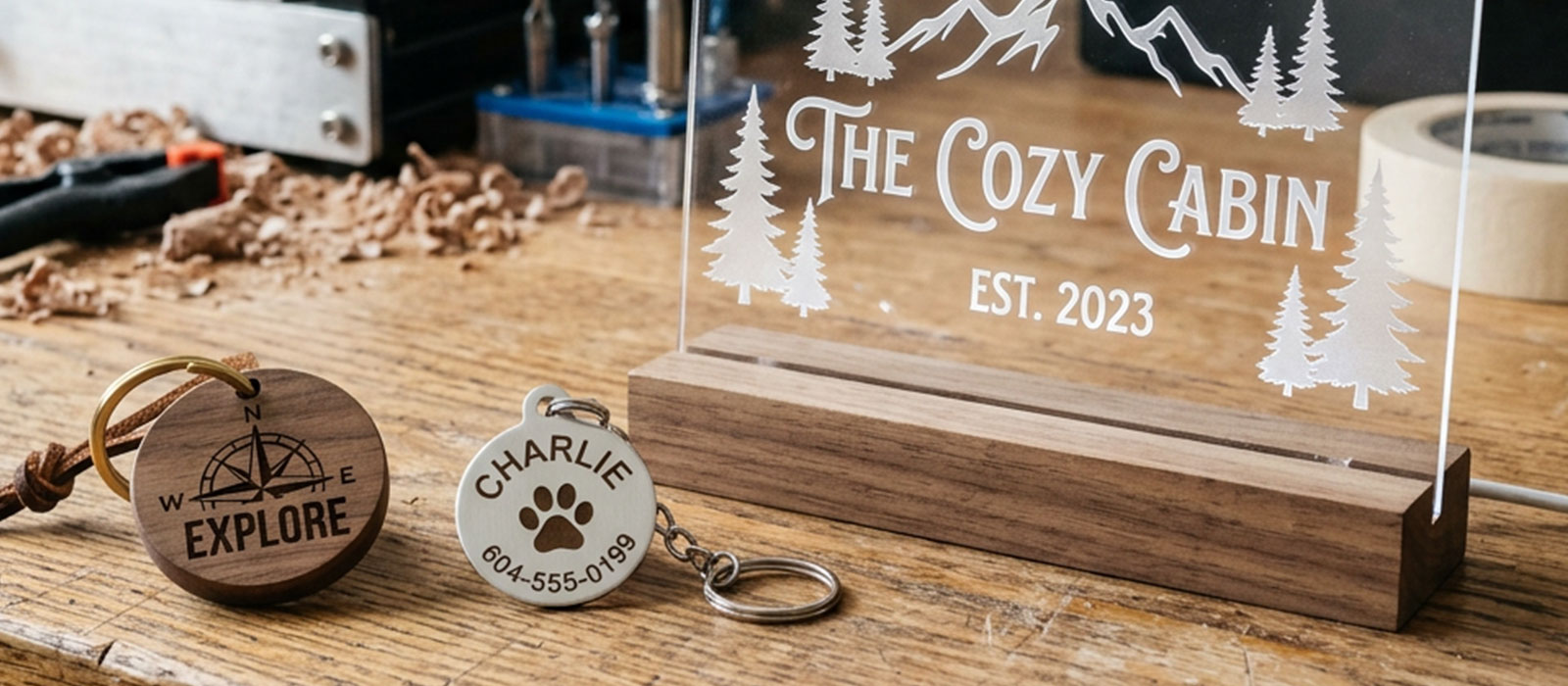
- Personalised keychain — Material: Beech Wood Keychain blanks, 10pc (CAT.NO TL9020). Bit: 3.175mm CNC Single Spiral Point (TL9011) for engraving a name or initial. Complexity: Beginner.
- Engraved cat ID tag — Material: Cat Tag stainless steel blanks, 5pc (CAT.NO TL9037). Bit: CNC Metal Milling Cutter 3.175mm (TL9008). Complexity: Beginner.
- Engraved dog ID tag — Material: Dog Tag stainless steel blanks, 5pc (CAT.NO TL9030). Bit: CNC Metal Milling Cutter 3.175mm (TL9008). Complexity: Beginner.
- Acrylic nameplate or desk sign — Material: Black Acrylic Sheet, 200 x 200 x 2mm (CAT.NO TL9048). Bit: CNC Double Edge Straight Grove Mill Cutter (TL9015) for the outline, single pass. Complexity: Beginner.
- Simple engraved coasters — Material: assorted blanks from the Mega 75pc Engraver Material Starter Pack (CAT.NO TL9047). Bit: CNC Double Edge Spiral Mill Cutter 3.175mm (TL9006). Complexity: Beginner.
- Cable and cord organiser — Material: an offcut from the engraver starter pack (TL9047) or a spare acrylic sheet (TL9048). Bit: CNC Double Edge Straight Grove Mill Cutter (TL9015) for the cable slots. Complexity: Beginner.
Intermediate Projects
Once single-pass cuts feel routine, these bring in finer detail, deeper pockets, and small batch runs. Expect to spend a bit more time dialling in feed rate and depth of cut, particularly on the layered and pocketed pieces below.
- Engraved metal business cards — Material: Aluminium Metal Business Cards, 9 colours, 100pc (CAT.NO TL9045). Bit: 3.175mm CNC Single Spiral Point (TL9011) for fine logo and text detail. Complexity: Intermediate.
- Layered acrylic sign — Material: two or more Black Acrylic Sheets (CAT.NO TL9048) stacked and pinned. Bit: CNC Double Edge Spiral Mill Cutter (TL9006) for the through-cuts and CNC Double Edge Straight Grove Mill Cutter (TL9015) for the base layer. Complexity: Intermediate.
- Contoured wall clock face — Material: a wood blank from the engraver starter pack (TL9047). Bit: CNC Double Edge Spiral Ball 3.175mm (TL9012) for a subtle contoured face around the numerals. Complexity: Intermediate.
- Desk organiser tray — Material: wood blanks from the engraver starter pack (TL9047). Bit: CNC Double Edge Spiral Mill Cutter 45mm (TL9013) for the deeper compartment pockets. Complexity: Intermediate.
- Batch of personalised pet tags — Material: Cat Tag and Dog Tag blanks (TL9037 and TL9030) run together. Bit: CNC Metal Milling Cutter 3.175mm (TL9008), same setup repeated across a batch. Complexity: Intermediate.
- Interlocking acrylic puzzle — Material: Black Acrylic Sheet (CAT.NO TL9048). Bit: CNC Double Edge Straight Grove Mill Cutter (TL9015) for clean interlocking teeth. Complexity: Intermediate.
Advanced Projects
These bring in contoured, multi-depth cutting and multi-piece builds, so they're worth saving until the projects above feel comfortable. Expect longer run times, more bit changes mid-job, and a bigger cost if a cut goes wrong, so a solid grasp of the basics pays off here.
- Contoured wooden phone stand — Material: a wood blank from the engraver starter pack (TL9047). Bit: CNC 2 Flute Taper Ball End Mill (TL9010) for the curved support profile. Complexity: Advanced.
- DIY CNC short stool build — Material: DIY CNC Short Stool Wood Kit (CAT.NO TL9060). Bit: CNC Tripple Edged Set 3.175mm, 10pc (TL9009) for the structural joinery cuts and CNC Double Edge Spiral Ball (TL9012) for detailing. Complexity: Advanced.
- Multi-layer acrylic light box — Material: several Black Acrylic Sheets (TL9048) engraved and stacked. Bit: CNC Double Edge Ball End Mill 3.175mm (TL9005) for the engraved detail layers, plus a straight bit for the outer cutouts. Complexity: Advanced.
- 3D relief wall art — Material: a wood blank from the engraver starter pack (TL9047). Bit: CNC Double Edge Ball End Mill (TL9005) for the rounded depth work and CNC 2 Flute Taper Ball End Mill (TL9010) for tapered edges. Complexity: Advanced.
Small-Business Project Ideas
These four projects are worth a look if you're thinking about selling what you make. Each one uses batch-friendly materials, so the same setup and bit run across multiple units with minimal changeover.
- Branded metal business cards — Material: Aluminium Metal Business Cards (TL9045). Bit: 3.175mm CNC Single Spiral Point (TL9011). A batch-run service for local businesses wanting a more memorable card.
- Custom pet ID tags for pet stores — Material: Cat Tag and Dog Tag blanks (TL9037 and TL9030). Bit: CNC Metal Milling Cutter 3.175mm (TL9008). A straightforward wholesale or in-store engraving service.
- Personalised keychains for markets — Material: Beech Wood Keychain blanks (TL9020). Bit: 3.175mm CNC Single Spiral Point (TL9011). Quick to batch-run for craft markets or gift orders.
- Custom acrylic signage for small shops — Material: Black Acrylic Sheet (TL9048), multiple sheets per job. Bit: CNC Double Edge Straight Grove Mill Cutter (TL9015) and CNC Double Edge Spiral Mill Cutter (TL9006). A local signage service for shopfronts, menus and stall signs.
Frequently Asked Questions
Do I need different bits for wood, acrylic and metal projects?
Yes. A spiral or straight bit handles wood and acrylic well, but metal, even soft aluminium or stainless tags, needs a bit built for metal, like Jaycar's CNC Metal Milling Cutter, run at a slower feed speed. Using a wood-rated bit on metal will dull or snap it quickly.
What's the easiest first CNC project for a total beginner?
A personalised keychain or an engraved pet tag is the best starting point. Both use a small, cheap blank, a single bit, and a simple shape, so a mistake costs you one blank rather than an expensive sheet of material.
Can these projects be made without buying pre-cut material blanks?
Yes, blanks just save you a setup step. Once you're comfortable with your machine, you can cut your own keychains, tags or signage from raw stock in the size and shape you want, using the same bits listed above.
How long does a typical beginner project take to cut?
Most of the beginner projects above run in well under an hour once the file is set up, with simple engraved items like tags and keychains often finishing in ten to twenty minutes. Intermediate and advanced projects with deeper pockets or multiple layers take longer.
Can I sell things I make on my CNC router?
Plenty of people do, particularly with batch-friendly items like engraved tags, keychains and signage. Start small, check your design doesn't copy someone else's branding or artwork, and confirm any material or safety requirements that apply to what you're selling.
What's the difference between engraving and cutting through material?
Engraving only removes a shallow layer to leave a mark or design, while cutting through goes all the way to the spoilboard to separate a shape from the sheet. Most beginner projects above are engraving jobs, while acrylic signs and puzzles are full cut-throughs.
Twenty projects is plenty to work through before you've exhausted what a beginner CNC setup can do. Start with a keychain or a pet tag, work up through the intermediate list as your confidence builds, and keep the small-business ideas in mind once you're ready to run a batch rather than a one-off. Whichever project you pick first, matching the right bit to the material is what separates a clean result from a wasted blank.